
How to Design a Multipurpose Built-In Desk for Home Offices
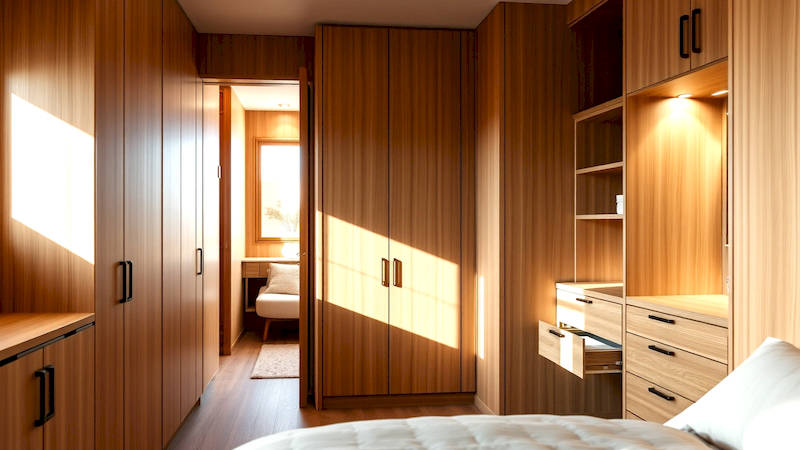
The rise of remote work and the increasing blending of personal and professional lives have made the home office a necessity for many. But the ‘office’ often isn't a dedicated room; it's a corner of a living room, a repurposed bedroom, or even a hallway nook. This necessitates smart, space-saving solutions, and few are as effective as a well-designed, multipurpose built-in desk. Unlike freestanding furniture, built-in desks maximize vertical space, integrate seamlessly with the room's architecture, and can be customized to handle a multitude of tasks beyond simple computer work. This article will guide you through the process of designing a multipurpose built-in desk, from initial planning and needs assessment to material selection and final finishing touches. A thoughtfully planned built-in isn’t just furniture; it’s an investment in productivity, organization, and the overall aesthetic of your home.
The demand for adaptable home office solutions is surging. According to a recent study by Statista, the number of people working from home in the US increased by over 150% between 2019 and 2023, a trend that shows no signs of significantly reversing. This shift highlights the importance of creating functional and aesthetically pleasing workspaces within the home. A multipurpose built-in desk addresses this need precisely, offering a centralized hub for work, hobbies, bill paying, storage, and more. It allows for decluttering other areas of the home and creating a designated zone for focused activity. Investing time and effort into designing this space will yield returns in terms of efficiency, wellbeing, and a more harmonious home environment.
Assessing Your Needs and Space
Before you even begin sketching designs, a thorough needs assessment is crucial. What primary functions will this desk serve? Is it solely for computer work, or do you also need space for writing, crafting, or client meetings? How much storage do you require – files, books, supplies, peripherals? Consider future needs as well. Will your work setup likely evolve, and if so, how can the desk adapt? Be realistic about your habits. Do you tend to accumulate clutter? Built-in storage needs to be sufficient to contain it. Don’t underestimate the value of considering ergonomics at this stage; proper height, depth, and accessibility will greatly influence your comfort and productivity during long work sessions.
The physical space available dictates the possibilities. Measure the area carefully, considering not just the footprint but also the height and depth. Note the location of windows, doors, outlets, and heating vents. Natural light is a huge asset for a workspace, so positioning the desk to maximize it is vital. Overlooking a visually appealing view can also boost morale. Existing architectural features like alcoves or unused wall space present unique opportunities. It is often helpful to create a scale floor plan, even a simple one, to visualize the desk’s placement and how it will interact with the surrounding environment. Remember to allow adequate clearance for comfortable movement around the desk.
Finally, think about the aesthetics. How do you want the desk to integrate with the existing décor? Do you prefer a minimalist, modern look, or something more traditional? The style of the desk should complement, not clash with, the overall design of the room. Consider the colors, materials, and finishes that will create the desired atmosphere. Gathering inspiration from online sources like Pinterest and Houzz can be immensely helpful in defining your style preferences.
Design Elements: Functionality and Features
A truly multipurpose built-in desk goes beyond a simple flat surface. Incorporate a variety of features to enhance its functionality. Adjustable shelving is invaluable, allowing you to customize storage space to accommodate different items. Consider closed cabinets for concealing clutter and open shelving for displaying books, plants or decorative objects. Drawers are essential for storing stationery, small electronics, and personal items. Integrating cable management systems – grommets, channels, and concealed compartments – is crucial for maintaining a clean, organized workspace. No one wants to trip over wires!
Beyond basic storage, think about specialized features. A pull-out keyboard tray saves valuable desk space when not in use. A built-in charging station keeps devices powered up and readily accessible. A small, dedicated space for a printer or scanner streamlines workflow. If you frequently participate in video conferences, consider a recessed area with appropriate lighting and a clean backdrop. For those with hobbies, a designated crafting or art area with built-in tool storage can be incorporated. As remote work blurs the lines between work and life, consider a ‘hideaway’ compartment that can securely store work materials at the end of the day, creating a clearer separation between professional and personal time.
Don’t forget about lighting. Integrated LED strips under cabinets provide task lighting, while a dedicated desk lamp offers adjustable illumination. Think carefully about the placement of outlets to ensure convenient access to power for all your devices. A well-lit workspace is essential for reducing eye strain and maximizing productivity.
Material Selection and Construction
The materials you choose will significantly impact the desk’s durability, aesthetics, and cost. Solid wood – oak, maple, walnut – offer a classic, high-end look and are incredibly durable. However, they are also more expensive and require careful finishing to prevent warping and damage. Plywood is a more affordable option that can be stained or painted to match your décor. MDF (Medium-Density Fiberboard) is another budget-friendly choice, but it is less durable than wood or plywood and is not ideal for areas prone to moisture.
Consider the countertop material carefully. Laminate is a durable, easy-to-clean option that comes in a wide range of colors and patterns. Butcher block adds warmth and character, but requires regular oiling to maintain its beauty. Quartz or granite provide a luxurious, durable surface, but are significantly more expensive. Hardware – drawer pulls, knobs, hinges – should be chosen to complement the overall style of the desk. Invest in high-quality hardware that will withstand frequent use.
Construction can be tackled by a skilled DIY enthusiast, but for complex designs, it’s recommended to hire a professional carpenter. They can ensure precise measurements, accurate cuts, and a flawless finish. If you’re building it yourself, ensure you have the necessary tools and skills. Safety is paramount – always wear appropriate safety gear and follow manufacturer’s instructions.
Optimizing Vertical Space: Shelving and Cabinets
Maximizing vertical space is a cornerstone of multipurpose built-in desk design. Shelving is your ally here. Varying shelf depths and heights creates visual interest and accommodates items of different sizes. Adjustable shelves offer maximum flexibility. Consider incorporating a mix of open and closed shelving. Open shelves are ideal for displaying books, plants, and decorative objects, while closed cabinets conceal clutter and create a more streamlined look.
Cabinets can be customized to suit your specific needs. Lower cabinets provide storage for larger items, while upper cabinets are perfect for files, office supplies, and infrequently used items. In shallow niches, consider slim cabinets extending toward the ceiling. Integrating pull-out drawers or organizers within cabinets makes accessing items easier and more efficient. Don’t overlook the potential of corner cabinets, which can be surprisingly spacious.
When planning shelving and cabinets, consider sightlines and accessibility. Items you use frequently should be within easy reach, while less frequently used items can be stored higher up or in less accessible areas. A well-planned shelving and cabinet system not only maximizes storage space but also creates a more organized and visually appealing workspace.
Ergonomics and Workflow Considerations
A functional desk isn’t just about storage; it’s about creating a comfortable and efficient workspace. Ergonomics are paramount. The desk height should be appropriate for your stature, allowing you to maintain good posture while working. The keyboard and mouse should be positioned so that your arms are at a 90-degree angle. A comfortable chair with good lumbar support is essential. Consider a standing desk converter if you want the option to alternate between sitting and standing.
Workflow is another critical consideration. Arrange frequently used items within easy reach. Position the monitor at arm’s length and at eye level to minimize neck strain. Ensure adequate lighting to reduce eye strain. Create dedicated zones for different tasks – a computer zone, a writing zone, a filing zone. A well-organized workspace minimizes distractions and promotes focus.
Consider the flow of tasks. If you frequently switch between computer work and paper-based tasks, ensure there’s sufficient space for both. If you need to collaborate with others, provide ample room for spreading out documents and materials. Anticipating your workflow needs and designing the desk accordingly will significantly enhance your productivity.
Finishing Touches and Personalization
Once the desk is built and installed, the finishing touches are what truly bring it to life. Painting or staining the wood, applying protective coatings, and adding hardware are crucial steps. Choose colors and finishes that complement your décor and create the desired atmosphere. Consider adding decorative elements – artwork, plants, personal photos – to personalize the space and make it feel more inviting.
Cable management is often overlooked, but it’s essential for maintaining a clean, organized workspace. Use cable ties, sleeves, and conduits to keep wires neatly bundled and out of sight. A power strip with surge protection is a must-have. Consider adding a wireless charging pad for your smartphone.
Finally, don’t be afraid to experiment and adapt the desk to your changing needs. A multipurpose built-in desk is an investment in your productivity and well-being, so make it a space that you truly enjoy working in. Regularly declutter and reorganize to maintain a functional and inspiring workspace.
Conclusion: Building Your Ideal Workspace
Designing a multipurpose built-in desk for your home office is an investment that pays dividends in terms of increased productivity, organization, and aesthetic appeal. By carefully assessing your needs, maximizing vertical space, prioritizing ergonomics, and adding personal touches, you can create a workspace that truly supports your work and lifestyle. Remember that planning is key. Taking the time to create a detailed design and select the right materials will ensure a successful outcome. Don’t be afraid to seek professional help if needed, and always prioritize safety during construction. The key takeaways are to prioritize functionality, tailor the design to your individual needs, and create a space that inspires you. Your ideal workspace awaits – start designing today!
Deja una respuesta