
Tips for Organizing and Hiding Remote Controls and Cables
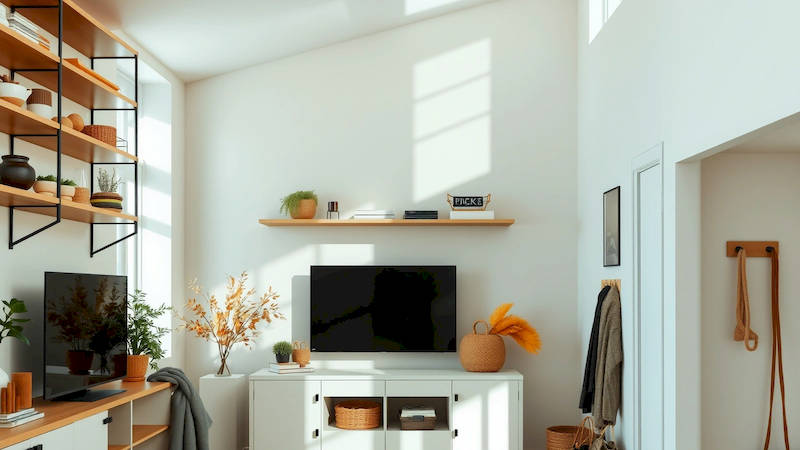
The modern living room is often a beautiful blend of comfort, style, and – let’s be honest – technology. But this convenience often comes at a cost: a chaotic landscape of remote controls, tangled cables, and a general feeling of visual clutter. It’s a common struggle. A recent study by the National Association of Home Organization (NAHO) found that 78% of homeowners cite electronic clutter as a major source of stress in their living spaces. Beyond the aesthetic impact, this disorganization can lead to lost remotes (and precious downtime!), damaged cables, and a generally frustrating experience. Fortunately, with a little planning and some clever strategies, you can regain control of your tech accessories and create a peaceful, organized living room. This article provides a comprehensive guide to conquering remote control and cable clutter, transforming your space into a haven of calm.
The pervasive nature of electronics in our lives means the problem isn't going away. From streaming devices and game consoles to sound systems and televisions, each piece adds to the potential for chaos. Ignoring this clutter isn’t just a cosmetic issue; it subtly impacts our mental wellbeing. A disorganized environment can increase cortisol levels (the stress hormone) and decrease focus. Creating a system for managing these items isn’t simply about tidiness; it’s about cultivating a more relaxing and functional living space. The solutions aren't extravagant or expensive – many effective methods utilize items you likely already have, or can acquire for a minimal cost.
Ultimately, successful organization is about creating sustainable habits. We'll move beyond simply hiding the clutter to establishing strategies that prevent it from accumulating in the first place. This involves not only choosing the right storage solutions but also incorporating mindful tech habits, making the effort to organize a routine part of your life, and regularly re-evaluating your systems to ensure they continue to meet your needs. Let's delve into the specific tactics you can employ to achieve a beautifully organized and tech-friendly living room.
- The Art of Remote Control Roundup & Categorization
- Creative Storage Solutions for Remote Controls
- Taming the Cable Jungle: Basic Wire Management
- Leveraging Wall Space for Hidden Storage
- The Power of Minimalism: Reducing Tech Clutter at the Source
- Regular Maintenance and Habit Building
- Conclusion: Reclaim Your Space, Reclaim Your Peace
The Art of Remote Control Roundup & Categorization
The first step toward overcoming remote control chaos is a thorough assessment. Gather every single remote control in your living room, even the ones you think you've lost. You'll be surprised how many turn up! Lay them all out on a table to gain a complete understanding of the extent of the problem. A key component of any successful organization project is to ruthlessly edit. Do you truly need every remote? Consider universal remotes as a potential solution. A high-quality universal remote can consolidate multiple functions into one device, drastically reducing the number of remotes cluttering your surfaces. Many models are programmable and compatible with a wide range of devices, simplifying your setup.
Once you've pared down the collection, it’s time to categorize. Group remotes based on the devices they control—TV, sound system, streaming device, etc. This categorization will dictate your storage approach. Don’t underestimate the power of labeling! A simple label maker or even handwritten labels can prevent confusion, especially when multiple remotes look similar. This is especially crucial for households with multiple users. For instance, clearly labeling a "Netflix Remote" versus a "Blu-Ray Remote" will save considerable time and frustration. Consider a system of color-coding, too, if that aligns better with your visual learning style.
Beyond categorization, think about how often you use each remote. The remotes used daily deserve prime real estate—easy accessibility from your favorite viewing spot. Less frequently used remotes can be stored further away, but still within reasonable reach. The goal is to balance convenience with visual order. Investing in a small, attractive caddy or tray specifically for frequently used remotes is a simple yet effective solution, keeping them contained and readily available.
Creative Storage Solutions for Remote Controls
Now that your remotes are categorized, it’s time to find homes for them. The key is to choose storage options that blend functionality with your living room's aesthetic. Traditional remote control caddies are a classic choice, available in a wide variety of materials, styles, and price points. From sleek metal designs to rustic wooden boxes, you can find one that complements your décor. However, don't limit yourself to conventional options. Consider repurposing items you already have.
A decorative box or basket placed on a coffee table or side table can discreetly hold multiple remotes. An old book, hollowed out to create a hidden compartment, offers a unique and charming storage solution. Think "outside the box" – literally! Another excellent option is utilizing the side pockets of armchairs or sofas. If your furniture doesn't have these, consider purchasing adhesive pockets specifically designed for remote storage. These are particularly useful for avoiding clutter on surfaces. For a more integrated solution, explore furniture with built-in remote storage. Many modern coffee tables and entertainment centers feature drawers or compartments specifically designed for tech accessories.
Beyond the visual aspect, consider accessibility. Avoid storage solutions that require excessive digging or maneuvering to retrieve a remote. The convenience factor is paramount. The goal is to make accessing remotes as effortless as possible, encouraging consistent use of the system. Regularly maintain the storage areas; don’t let remotes spill out or accumulate dust.
Taming the Cable Jungle: Basic Wire Management
Cables are often the biggest visual offender in a cluttered living room. A tangled mess of wires not only looks unsightly but can also be a safety hazard. The first step is disconnecting all devices and sorting the cables. Identify which cables belong to which devices. It may sound tedious, but it's essential for effective organization. Labeling is again your friend here. Use cable ties, Velcro straps, or even simple twist ties to bundle cables together. This prevents them from becoming tangled and creates a cleaner appearance.
The key is to contain and conceal. Cable management boxes are specifically designed to hide power strips and excess cable length. These boxes come in various sizes and styles, offering a discreet way to manage cable clutter behind your entertainment center. Alternatively, you can use cord concealers, which are plastic channels that attach to walls or furniture, hiding cables from view. Consider utilizing existing furniture features. Most entertainment centers have pre-drilled holes for cable management. Make use of these to route cables neatly and discreetly.
Don’t underestimate the power of strategically placed furniture. Positioning furniture to partially obscure cables can minimize their visual impact. Remember to leave a little slack in the cables to allow for easy movement of devices. Avoid over-tightening cable ties, which can damage the wires over time. Regularly check and adjust your cable management system to ensure it continues to function effectively.
Leveraging Wall Space for Hidden Storage
Wall space is often underutilized in living rooms, offering a valuable opportunity for hidden storage. Floating shelves can create a stylish and functional display while also concealing cables and even small remote control storage boxes. Choose shelves that are deep enough to accommodate cables and accessories without being overly bulky. Another option is installing a recessed outlet with built-in cable management. These outlets allow you to hide cables within the wall, creating a clean and seamless look.
This is particularly effective behind your television. Instead of trailing cables across the floor or wall, you can route them through the wall, concealing them from view. For more ambitious projects, consider building a custom entertainment center with hidden compartments specifically designed for storing cables and electronic devices. This provides a tailored solution that seamlessly integrates into your living room’s design.
Remember to prioritize safety when working with electrical wiring. If you’re not comfortable working with electricity, consider hiring a qualified electrician to install recessed outlets or other electrical modifications. Ensure your wall-mounted solutions are securely anchored to the wall to prevent accidents.
The Power of Minimalism: Reducing Tech Clutter at the Source
While organizing and concealing clutter is essential, preventing it from accumulating in the first place is even more effective. Embrace a minimalist approach to your tech setup. Do you really need three streaming devices? Consolidate whenever possible. Consider cloud-based storage solutions to reduce the need for external hard drives and USB drives. Streamline your entertainment setup by utilizing smart home devices. A smart remote or voice assistant can control multiple devices, reducing the number of remotes you need.
Before purchasing new electronic devices, consider whether you truly need them. Avoid impulse buys and carefully evaluate whether a new device will genuinely enhance your living room experience. When discarding old electronics, do so responsibly. Most communities offer electronic recycling programs, ensuring that your old devices are disposed of safely and environmentally. Regularly review your tech setup and identify items that are no longer being used. Donate or sell these items to declutter your space and potentially earn some extra cash.
Regular Maintenance and Habit Building
Organization isn't a one-time event; it’s an ongoing process. Schedule regular maintenance sessions – even just 15-20 minutes a week – to address any accumulating clutter. This prevents the problem from spiraling out of control. Establish a "home" for every remote and cable. If an item doesn't have a designated place, it's more likely to end up contributing to the clutter.
Encourage all members of your household to participate in the organization system. Consistency is key. Implement a "put it back" rule – immediately return remotes to their designated storage spots after use. Train family members to follow suit. Finally, be prepared to adapt and refine your system over time. As your tech setup evolves, your organization system may need to be adjusted to accommodate new devices and accessories.
Conclusion: Reclaim Your Space, Reclaim Your Peace
Organizing remote controls and cables isn’t just about aesthetics; it's about creating a more functional, relaxing, and enjoyable living space. By employing a combination of strategic storage solutions, mindful tech habits, and regular maintenance, you can tame the tech and reclaim your living room. Remember to categorize and label remotes, utilize creative storage options, effectively manage cables, leverage wall space, embrace minimalism, and build consistent organizational habits.
The key takeaways are these: prioritization (what’s used most?), categorization (grouping like items), and consistent maintenance (making it part of your routine). Don’t strive for perfection, aim for progress. Start with one small step – perhaps organizing just the remotes – and build from there. A clutter-free living room isn’t just a visually appealing space; it's a sanctuary where you can relax, unwind, and truly enjoy your home. The initial effort will be rewarded with a sense of calm, control, and a living room that truly reflects your style and values.
Deja una respuesta