
Best Ergonomic Desk Setups for Small Home Workspaces
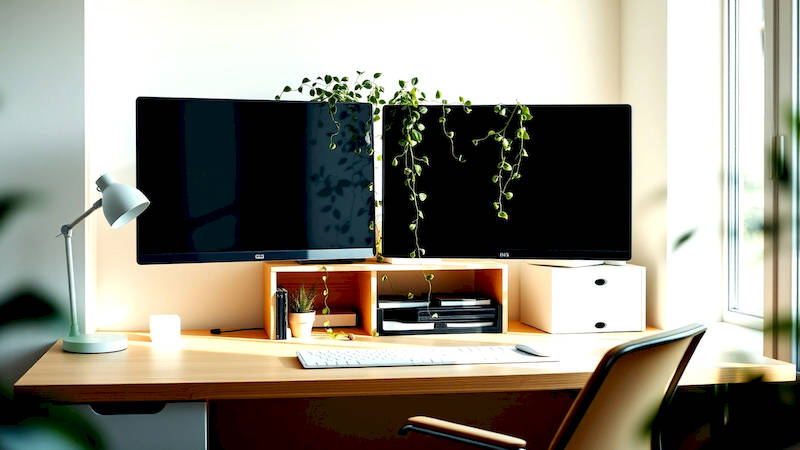
The rise of remote work has blurred the lines between our professional and personal lives, often forcing us to carve out workspaces in less-than-ideal locations. A spare corner, a converted guest room, or even a portion of the living room have become the new normal for millions. However, simply having a workspace isn't enough. Without careful consideration for ergonomics – the science of designing for human use – these improvised offices can lead to discomfort, pain, and a significant dip in productivity. This is particularly crucial in smaller spaces where maximizing every inch while maintaining physical well-being requires thoughtful planning.
Many assume ergonomic setups are expensive and require a large room. This isn't true. Smart choices in furniture, mindful arrangement, and a focus on adjustable elements can transform even the tiniest alcove into a comfortable and efficient work area. Ignoring ergonomics isn’t just about fleeting discomfort; prolonged poor posture can contribute to musculoskeletal disorders (MSDs), a major cause of work-related disability. According to the Occupational Safety and Health Administration (OSHA), MSDs account for over 30% of all worker injury and illness cases.
This article will delve into creating optimal ergonomic desk setups for small home workspaces, focusing on actionable steps you can take to protect your health and boost your performance without breaking the bank or sacrificing valuable floor space. We’ll cover everything from desk and chair selection to monitor positioning and essential accessories.
Selecting the Right Desk for Limited Space
The foundation of any ergonomic workspace is, unsurprisingly, the desk itself. In a smaller home office, size is paramount. Forget large executive desks; you’ll need to prioritize functionality and proportions. Corner desks are often excellent choices as they utilize otherwise wasted space, providing a surprising amount of surface area. Another great option is a compact, rectangular desk specifically designed for small spaces, often featuring minimalist designs to visually expand the room. Look for desks with integrated cable management solutions as cluttered cables contribute to both visual and physical discomfort.
Consider a standing desk converter if a full standing desk isn't feasible. These devices sit atop your existing desk, allowing you to easily switch between sitting and standing positions. This is particularly beneficial as prolonged sitting has been linked to a variety of health issues. A study published in the Annals of Internal Medicine found that interrupting prolonged sitting with short bouts of standing significantly improved metabolic health. Adjustable height desks, even compact ones, represent a worthwhile investment.
Beyond size, desk material is crucial. Opt for a smooth, durable surface that's easy to clean. Avoid glass tops, which can cause glare, and overly glossy finishes, which can be distracting. A matte finish is generally preferable. Finally, think about storage. Desks with built-in drawers or shelving can minimize the need for additional furniture, maximizing your limited space.
The Importance of an Ergonomic Chair
While a well-chosen desk provides the platform for work, the chair is where you’ll spend the majority of your time. A supportive, adjustable ergonomic chair is non-negotiable. Look for a chair with adjustable height, lumbar support, armrests, and seat depth. These features allow you to customize the chair to your body’s unique needs, promoting proper posture and reducing strain. Don’t fall into the trap of prioritizing aesthetics over ergonomics – a stylish chair that doesn't offer adequate support is a waste of money.
Lumbar support is arguably the most critical feature. The natural curve of your spine should be supported to prevent slouching. Adjustable armrests are also essential, allowing your shoulders to relax and your elbows to rest at a 90-degree angle. Avoid chairs with overly firm or overly soft cushioning; a balance is key. Investing in a high-quality ergonomic chair is an investment in your long-term health and productivity. According to a 2018 study by the Herman Miller Research Group, employees with ergonomically designed workstations experienced a 17.3% improvement in productivity.
Consider a mesh back for increased breathability, especially if you live in a warmer climate. Also, ensure the chair has a five-star base for stability and smooth-rolling casters to allow for easy movement within your small workspace. Taking short breaks to move around is important, but the chair should allow for freedom of movement within the workspace as well.
Optimizing Monitor Position and Viewing Distance
Monitor placement is often overlooked, but it's a significant contributor to eyestrain, neck pain, and headaches. The top of your monitor should be at or slightly below eye level. This prevents you from craning your neck upwards, which can lead to muscle fatigue. The monitor should be positioned an arm’s length away – approximately 20-40 inches, depending on your screen size. Ensure the screen is directly in front of you to avoid twisting your neck.
For laptops, the built-in screen is often too low. Consider using a laptop stand to raise it to the correct height, and connect an external keyboard and mouse to maintain proper arm and wrist posture. If you use multiple monitors, position the primary monitor directly in front of you, and the secondary monitor(s) to the side at a slight angle. "Expert systems suggest arranging monitors in a slight arc to reduce eye and neck strain when frequently switching attention between displays,” says Dr. James Levine, a renowned expert in sedentary behaviour and ergonomics.
Minimize glare by positioning your monitor away from direct sunlight or bright lights. Use an anti-glare screen protector if necessary. Regular breaks are also crucial - follow the 20-20-20 rule: every 20 minutes, look at something 20 feet away for 20 seconds to reduce eye strain.
Leverage Vertical Space and Smart Storage Solutions
Small workspaces demand ingenious storage solutions. Think vertically. Utilize wall-mounted shelves to store books, binders, and other essential items, freeing up valuable desk space. Floating shelves create a clean, minimalist look and are relatively easy to install. Consider a rolling cart for items you need to access frequently but don’t want cluttering your desk, such as a printer or scanner.
Wall organizers with pockets or cubbies can hold pens, notepads, and other small supplies. Take advantage of the space under your desk by using storage bins or drawers. De-cluttering regularly is essential. A minimalist approach not only creates a more spacious feel but also reduces visual distractions. Regularly purge unnecessary items, and invest in digital alternatives whenever possible.
Don't underestimate the power of cable management. Cluttered cables are an eyesore and a potential tripping hazard. Use cable ties, sleeves, or boxes to keep cables organized and out of sight. This simple step can dramatically improve the overall appearance and functionality of your workspace.
Keyboard, Mouse & Accessories for Ergonomic Harmony
The keyboard and mouse are arguably the most frequently used tools in any workspace. Choose a keyboard and mouse that fit your hand size and typing style. Ergonomic keyboards are designed to promote a more natural hand and wrist position. Split keyboards can be particularly beneficial for people with carpal tunnel syndrome or other wrist pain. A wrist rest can provide additional support and cushioning.
Similarly, an ergonomic mouse can reduce strain on your wrist and hand. Vertical mice are designed to position your hand in a more natural, handshake-like position. Ensure your mouse is positioned close to your keyboard to avoid reaching. Consider a trackball mouse as an alternative, which requires less arm movement.
Don't overlook other accessories. A document holder can position papers at eye level, reducing neck strain. A footrest can provide support for your feet and improve circulation. A headset can reduce neck and shoulder strain during phone calls. Every small detail contributes to the overall ergonomic health of your workspace.
Ongoing Adjustments & Movement: The Key to Sustained Comfort
Ergonomics isn’t a 'set it and forget it' process. Your body changes, your tasks evolve, and your workspace may need adjustments accordingly. Regularly reassess your setup – are you still maintaining proper posture? Are your wrists and hands comfortable? Are you experiencing any pain or discomfort? Make small adjustments as needed. Small adjustments made consistently can prevent larger problems down the road.
Most importantly, remember to move. Prolonged sitting, even with a perfectly ergonomic setup, is detrimental to your health. Take frequent breaks to stand up, stretch, and walk around. Set a timer to remind yourself to move every 30-60 minutes. Encourage microbreaks focused on simple stretches and body movement. According to the Mayo Clinic, even short bursts of activity can improve blood flow and reduce muscle fatigue.
In conclusion, creating an ergonomic desk setup in a small home workspace requires careful planning and attention to detail. By prioritizing adjustable furniture, proper monitor positioning, smart storage solutions, and a commitment to movement, you can transform even the tiniest space into a comfortable, productive, and healthy work environment. The key takeaways are to invest in a quality chair, optimize your monitor height and distance, leverage vertical space for storage, and remember that ergonomics is an ongoing process of adjustment and improvement. Taking these steps will safeguard your physical well-being and unlock your full potential.
Deja una respuesta