
Optimizing Light Placement for an Efficient and Comfortable Desk Area
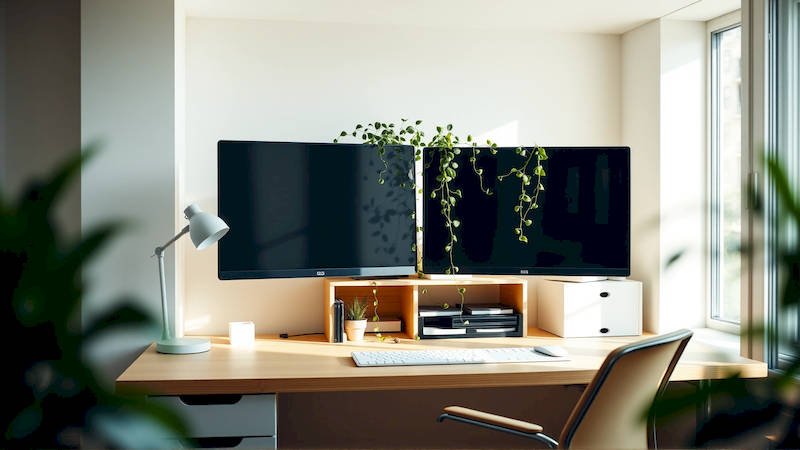
The modern home office has become a necessity for many, blurring the lines between work and personal life. While factors like ergonomic chairs and adjustable desks often take center stage in home office optimization, the critical role of lighting is frequently overlooked. Poorly placed or inadequate lighting doesn't just cause eye strain and headaches; it dramatically impacts productivity, mood, and overall well-being. In fact, studies show that access to natural and appropriate artificial light can increase productivity by as much as 15%. Creating an efficiently and comfortably lit desk area requires a thoughtful approach, moving beyond simply having a light source to considering the type, placement, and integration of multiple light sources.
This article will delve into the science of lighting and translate it into practical strategies for optimizing light placement in your home office. We'll explore the different types of light, the common pitfalls to avoid, and the specific techniques to maximize both efficiency and comfort when setting up your desk area. Ignoring lighting is ignoring a foundational element of a productive workspace – let's illuminate the path toward a more functional and healthier home office.
- Understanding the Fundamentals of Office Lighting
- The Critical Role of Task Lighting
- Maximizing Ambient Lighting for Overall Comfort
- Mitigating Glare and Reflections
- Layering Lights: Combining Ambiance and Functionality
- The Ergonomics of Lighting: Position and Distance
- Conclusion: Illuminating Your Path to Productivity
Understanding the Fundamentals of Office Lighting
Effective desk lighting isn’t about brightness; it’s about balance and minimizing glare. The goal is to create a layered lighting scheme, using a combination of ambient, task, and accent lighting to suit various activities. Ambient lighting provides overall illumination, much like overhead fixtures in a traditional office. Task lighting, specifically focused on your workspace, provides the necessary light for reading, writing, or working on a computer. Finally, accent lighting adds visual interest, though it’s less crucial for pure functionality in a desk area. Understanding the interplay of these three layers is the first step toward optimal lighting.
A common mistake is relying solely on overhead ambient lighting. This often creates harsh shadows and glare on your computer screen, leading to eye strain and fatigue. Furthermore, the quality of light matters. Color temperature, measured in Kelvins (K), impacts mood and alertness. Cooler temperatures (5000-6500K) mimic daylight and boost concentration, while warmer temperatures (2700-3000K) are more relaxing. For a desk area, a generally recommended color temperature falls between 3500-5000K, adaptable to the time of day and personal preference. "The most common ergonomic complaints amongst remote workers are related to visual discomfort," notes Dr. Emily Carter, an occupational health specialist. "Appropriate lighting is therefore preventative, not just corrective.”
Finally, consider the concept of Light Reflectance Value (LRV). This measurement indicates how much light a surface reflects. Darker surfaces absorb light, requiring brighter sources, while lighter surfaces reflect it, creating a more diffused and comfortable illumination. Think about the color of your walls, desk, and any surrounding furniture when planning your lighting setup.
The Critical Role of Task Lighting
Task lighting is arguably the most important element in your desk area lighting scheme. This is the light directly focused on your work, and it demands careful consideration. Traditional desk lamps, while readily available, aren’t always the best solution. Many cast harsh shadows or don’t offer enough adjustability. LED desk lamps, especially those with adjustable brightness and color temperature, are a far superior option. Look for lamps with a flexible arm and head, allowing you to direct the light precisely where you need it.
A crucial detail frequently overlooked is light direction. Ideally, your task light should come from the side opposite your dominant hand. This prevents the light from shining directly onto your work, creating glare and obscuring your view. For right-handed individuals, position the lamp on the left side of the desk, and vice versa. Additionally, the height of the lamp is important. It should illuminate your work without shining directly into your eyes. A good rule of thumb is to position the light source around 12-18 inches above your work surface. Consider a lamp with a diffusion panel to soften the light and reduce glare.
Furthermore, explore the possibilities of under-cabinet lighting if you have overhead cabinets. This provides task lighting directed towards your workspace without taking up valuable desk space.
Maximizing Ambient Lighting for Overall Comfort
While task lighting is focused, ambient lighting sets the overall mood and reduces eye strain by providing general illumination. If possible, utilize natural light as your primary source of ambient light. Position your desk near a window, but avoid direct sunlight, which can create glare and overheating. Use sheer curtains or blinds to diffuse the sunlight and control the amount of light entering the room. Natural light offers the closest experience to full-spectrum light and is highly beneficial for both physical and mental well-being.
If natural light is limited or unavailable, consider using a combination of overhead fixtures and wall sconces to create an even distribution of ambient light. Avoid relying solely on a single overhead fixture, as this can create harsh shadows. Opt for fixtures with dimming capabilities, allowing you to adjust the brightness levels throughout the day. Warmer color temperatures (2700-3000K) are ideal for ambient lighting, creating a more relaxing and inviting atmosphere. The goal is to create a soft, diffused base level of light that supports your task lighting, rather than dominating it.
Remember that wall color and furnishings impact the overall ambient light level. Lighter colored walls will reflect more light, creating a brighter and more spacious feeling.
Mitigating Glare and Reflections
Glare is the enemy of productivity and comfort. It causes eye strain, headaches, and reduces visual clarity. A primary source of glare in a home office is the computer screen itself. Position your desk so that windows or bright lights are not directly reflected on the screen. Adjusting the angle of your monitor can also help minimize reflections. This may involve repositioning the monitor or tilting the screen slightly.
Beyond the monitor, consider the surfaces surrounding your desk. Glossy surfaces, like varnished wood or polished metal, can create unwanted reflections. If possible, opt for matte finishes for your desk, walls, and furniture. Utilizing an anti-glare screen protector can also significantly reduce reflections from the computer monitor. Remember to consistently assess your setup throughout the day as the position of the sun changes, potentially creating new glare sources.
Investing in quality lamps with diffusion panels is another vital component in minimizing glare. These panels help to scatter the light, reducing harshness and creating a more comfortable visual environment.
Layering Lights: Combining Ambiance and Functionality
The most effective desk area lighting comes from layering sources. Don’t be afraid to combine multiple desk lamps with different features—one for focused task lighting and another for softer, supplemental illumination. Consider incorporating an uplight to bounce light off the ceiling, creating a more diffused and natural ambiance. Think about the activities you perform at your desk and tailor your lighting to suit those needs. If you frequently read physical documents, ensure you have adequate task lighting for comfortable reading.
Many modern smart home lighting systems allow for scene creation, simplifying this process. You can preset different lighting configurations for various tasks, such as "focused work," "video conferencing," or "reading." These systems can also automatically adjust the color temperature and brightness levels throughout the day, mimicking the natural circadian rhythm. "Dynamic lighting is a gamechanger for home office ergonomics," claims Marcus Klein, a lighting design consultant. "It mimics natural light, boosting productivity and reducing eye strain."
Don't hesitate to Experiment with different bulb types (LED, halogen, incandescent) and color temperatures to find what works best for your eyes and work style.
The Ergonomics of Lighting: Position and Distance
Optimizing light isn't just about brightness and color; it’s also about proper positioning and distance. The goal is to minimize eye strain and maintain a comfortable viewing angle. As mentioned earlier, the distance between your task light and your work surface should be between 12-18 inches. The light source should also be positioned to the side, preventing glare and shadows. Regularly check your posture and adjust the height of your monitor and lamp to ensure everything aligns ergonomically.
Consider the concept of visual comfort probability (VCP). VCP is a measurement of how likely people are to find a lighting system comfortable. It takes into account factors like brightness, contrast, and glare. Aim for a VCP of 70% or higher to ensure a comfortable viewing environment. This can be achieved through careful light placement and the use of diffused light sources. Regularly taking breaks and looking away from your screen is equally crucial for preventing eye strain, even with optimal lighting. Remember the 20-20-20 rule: Every 20 minutes, look at something 20 feet away for 20 seconds.
Conclusion: Illuminating Your Path to Productivity
Optimizing light placement in your desk area isn’t merely about aesthetics; it's a fundamental component of a productive and comfortable work environment. By understanding the principles of layered lighting—ambient, task, and accent—and carefully considering factors like color temperature, glare mitigation, and ergonomic placement, you can significantly enhance your well-being and performance. Remember to prioritize task lighting with adjustable features, utilize natural light whenever possible, and avoid harsh shadows and reflections.
The key takeaways are clear: a layered lighting approach, a focus on minimizing glare, and an understanding of color temperature are crucial. Actionable next steps include assessing your current setup, identifying areas for improvement, and investing in quality lighting fixtures. Don't underestimate the power of even small adjustments - a repositioned lamp or a dimmer switch can make a world of difference. By taking the time to illuminate your workspace thoughtfully, you’re investing in your health, productivity, and overall work-life balance.
Deja una respuesta